Build invoices in seconds — add items, adjust quantities, and manage line items.
Adding Items to Invoice
There are two ways to add items:
Method 1: Click from Search Results
- Search for product in left panel
- Click any row in the results table
- Item is added to invoice with quantity = 1
Method 2: Click Again to Increase Quantity
- Click the same product again
- Quantity automatically increases by 1
- No duplicate rows created
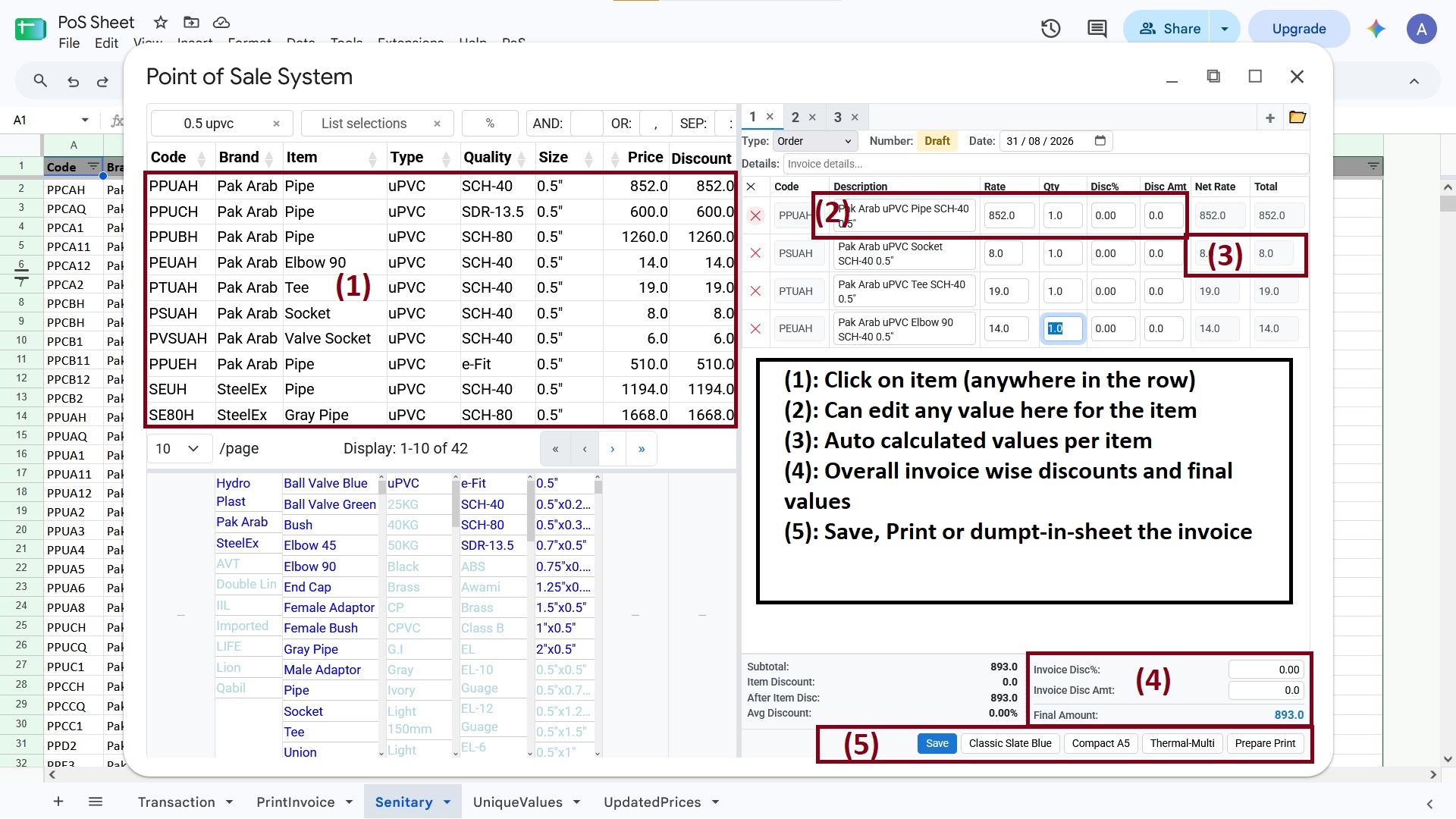
Adding items to invoice from search results
Editing Line Items
Each line item has these editable fields:
| Field | Type | Description |
|---|---|---|
| Code | Readonly | Product identifier |
| Description | Editable | Text area, auto-resizes |
| Rate | Editable | Unit price |
| Qty | Editable | Quantity (with decimals) |
| Disc% | Editable | Discount percentage |
| Disc Amt | Editable | Discount amount |
| Net Rate | Readonly | Rate after discount |
| Total | Readonly | Net Rate × Qty |
Keyboard Navigation
- Enter: Move to next editable field
- Click on numeric field: Selects all text
- Tab: Navigate between fields naturally
Removing Items
Click the red ✕ button on any row to remove that item from the invoice.
Next: Learn about Managing Discounts.